

Claude (web/desktop)
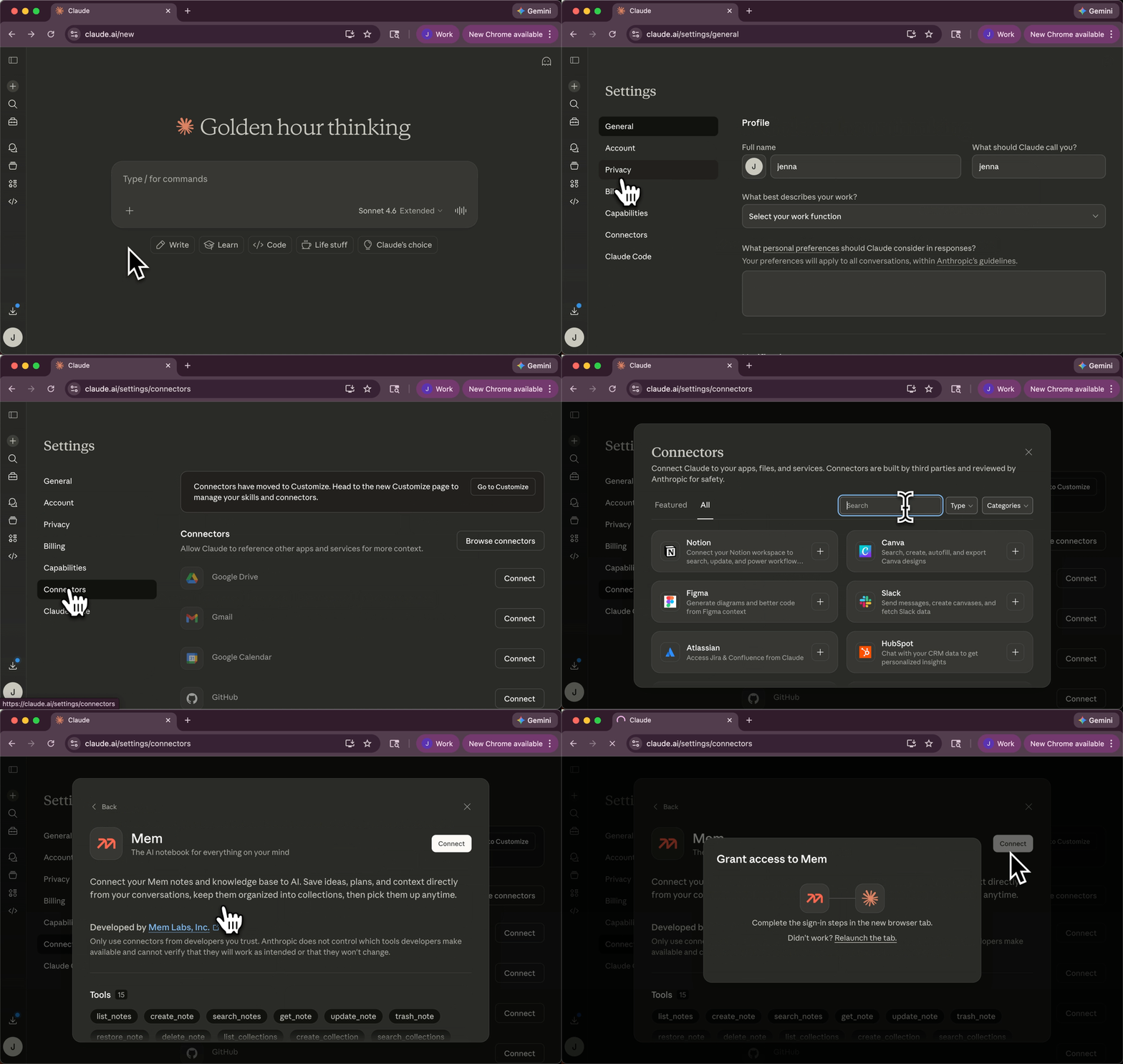
Use the following instructions to connect the Mem MCP server to Claude.1
Open settings
Open the sidebar to get to the Customize page.
2
Add connector
On the Customize page, click Connectors, then click + to add a connector.
Find Mem and add it.
3
Complete flow
Complete the OAuth flow to connect your Mem workspace.
Alternative: Add a custom connector manually
Alternative: Add a custom connector manually
1
Open connector settings
Open Settings -> Connectors.
2
Add custom connector
Click Add custom connector and enter:
3
Authenticate
Complete the OAuth flow to connect your Mem workspace.
ChatGPT
1
Install Mem from the ChatGPT store
Open Mem on the ChatGPT store and click Connect.
2
Follow the prompts in ChatGPT
ChatGPT walks you through the remaining setup.
Claude Code CLI
1
Add remote HTTP MCP server
2
Authenticate
Run
/mcp in Claude Code and complete the browser OAuth flow.Codex CLI
1
Add Mem MCP in Codex CLI
2
Authenticate
Start a Mem tool call in Codex and complete the OAuth flow when prompted.
Gemini CLI
1
Add Mem MCP in Gemini CLI
2
Authenticate
Run
gemini, then /mcp auth mem to complete the browser OAuth flow.Provider docs
- Claude connectors docs
- Manage Claude’s tool access
- Use connectors to extend Claude’s capabilities
- ChatGPT connectors docs
- ChatGPT developer mode + full MCP connectors docs
- Claude Code MCP docs
- Codex MCP docs
- Gemini CLI MCP docs
Troubleshooting
OAuth flow does not open or complete
OAuth flow does not open or complete
- Make sure your client can open a browser window for sign-in and consent.
- If the flow was interrupted, disconnect and reconnect the Mem connector in your client.
- Confirm you are signing in to the intended Mem account/workspace.
Claude shows Requested and asks for owner approval
Claude shows Requested and asks for owner approval
If you are on a Claude Team or Enterprise plan, a Claude Owner or Primary Owner needs to enable Mem for the organization before members can connect it.Ask the owner to add Mem in Organization settings -> Connectors. After Mem is available for the organization, connect your own Mem account from your Claude connector settings.
I get 429 Rate limit exceeded
I get 429 Rate limit exceeded
- Reduce request frequency and batch larger operations when possible.
- Respect
Retry-Afterbefore retrying. - Review current limits at /api-reference/overview/rate-limits.
Mem tools do not appear in my client
Mem tools do not appear in my client
- Verify the connector URL is exactly
https://mcp.mem.ai/mcp. - Re-list connectors/servers in your client and confirm Mem is enabled.
- Retry the setup flow for your client.
Claude is not finding the Mem tool I need
Claude is not finding the Mem tool I need
- In Claude, open the
+menu, then go to Connectors and confirm Mem is enabled for the current conversation. - Check Connectors -> Tool access. In
On demand, Claude searches for the right connector before loading it, which can add an extra discovery step. - If you need Mem to be available every time in that conversation, switch Claude to
Always available. - Be explicit in your prompt when needed, for example:
Use the Mem connector for this task. - If Claude still does not load Mem, disconnect and reconnect the Mem connector, then retry the conversation.
- Anthropic documents this behavior here: